


Official Policy · MT5 Specifications · Online Customer Service Reply Cross-Verified, with Specification Screenshots of Five Instruments and Original Customer Service Chat Screenshots (November 2026) (November 2026)
Pepperstone Does Not Disclose the Minimum Stop Distance
Key Conclusions
l Minimum stop distance: not officially disclosed. The policy document only states that "a minimum distance must be maintained"; the "Stops Level" for all five instruments in MT5 shows 0, and online customer service explicitly replied that "no exact figure is provided here."
l Practical rule: the minimum distance is no less than the current spread, and it moves up as the spread widens. When setting a stop loss, leaving a buffer of at least 1.5 times the prevailing spread will generally prevent rejection.
l Partial fills: permitted by the system (all-or-partial IOC). Rarely encountered with small orders; large orders may be partially filled or experience greater slippage during illiquid periods.
l Position limit per instrument: gold 136 lots, silver only 4 lots(combined open positions and pending orders; essential reading for EA and heavy-position users).
l Scalping and EAs: permitted, no minimum holding time, no penalty for short-term trading(confirmed in writing by customer service).
l Verification date: November 2026. Evidence includes the original text of the official Order Execution Policy, MT5 specification screenshots of five instruments, and customer service chat screenshots, all archived with this article.
This figure has not been officially disclosed, and it cannot be obtained from customer service either.
Three channels, one conclusion:
First, the policy text says "it is required" but does not say "what it is." Pepperstone's Order Execution Policy states: "When placing an order, a stop loss must be set at a minimum point distance from the prevailing available market price to be valid." — The rule exists, but the value is missing. The same document adds that a stop loss placed within the bid-ask spread will be deemed invalid and automatically deleted, indicating that this line is at least no smaller than the spread.
Second, the platform parameter shows 0. In the MT5 specification window, the "Stops Level" field for all five instruments (XAUUSD, XAGUSD, EURUSD, and two index CFDs) shows 0. A value of 0 does not mean "no restriction"; it means "no client-side validation, with the decision resting on the server."
Third, customer service twice explicitly stated that "this is not provided here." When asked about the minimum stop-loss distance for XAUUSD, the reply was: "The exact minimum stop-loss level (in points) for XAUUSD is not provided here. If needed, we can transfer you to a human specialist." When asked about the minimum distance for pending orders, the reply was likewise: "The exact minimum distance (in points) for pending orders is not provided here."
The three sources corroborate one another:this rule genuinely exists, but its value is kept inside the system, and no public channel can access it. This is not a practice unique to Pepperstone, but rather a common practice across the entire retail CFD industry — it is just that almost no one has laid these three layers out in front of readers like this. This article does exactly that, and also includes several other "rules no one has written about" uncovered along the way during the verification process.
I. Verification Method: Three Channels, Seven Questions, Cross-Validated
| Verification Channel | What Was Asked | Reply Received (Key Points) | Conclusion |
| Policy documents | Minimum stop-loss distance | "Must be a minimum number of points from market price to be valid," no value given | Rule exists; value not disclosed |
| MT5 specification window | Stop level | 0 (consistent across all five instruments) | Client does not block; judgment rests with the server |
| Online customer service | How many points is the XAUUSD stop-loss distance | "The exact figure is not provided here," can transfer to a human agent | Frontline customer service has no data |
| Online customer service | Minimum distance of pending orders from market price | Same as above, with a query path attached | Same as above |
| Online customer service | How is the remaining volume of a large order handled | "Not enough information here," gave order-splitting advice | Handling rules not disclosed |
| Online customer service | Are there any restrictions on placing orders during NFP | Spreads will widen; "not enough information" on order restrictions | Trading allowed; the cost lies in the spread |
| Online Support | EA & Scalping Restrictions | Allowed; no minimum holding period, no short-term trading penalty | The most straightforward answer |
Out of seven checks, five yielded clear answers, and two returned "insufficient information.""Insufficient information" is itself information: it indicates that this figure is not in the customer service knowledge base—frontline support is a relay layer, not a rules layer.
II. MT5 Specification Window Parameters: Complete Data for Five Instruments (with Screenshots)
The specification window is the only place where "system-level parameters" can be viewed. The full parameters for all five instruments are as follows:
| Parameter | XAUUSD | XAGUSD | EURUSD | GER40* | US30* |
| Stop Level | 0 | 0 | 0 | 0 | 0 |
| Execution Order | All or Part (IOC) | All or Part (IOC) | All or Part (IOC) | All or Part (IOC) | All or Part (IOC) |
| Minimum Volume (Lots) | 0.01 | 0.01 | 0.01 | 0.1 | 0.01 |
| Maximum Volume (Lots) | 50 | 20 | 100 | 100 | 150 |
| Step | 0.01 | 0.01 | 0.01 | 0.1 | 0.1 |
| Trading volume limit (total positions + pending orders) | 136 | 4 | 1719 | 1500 | 2000 |
| Margin leverage | 1:100 | 1:50 | 1:100 | 1:500 | 1:500 |
| Triple margin day | Wednesday | Wednesday | Wednesday | Friday | Friday |
| Large order margin tiers | 2.5x above USD 15 million | 2.5x above 250k notional | 2.5x above USD 5 million | — | — |
| Carrying cost type | Points mode | Points mode | Points mode | By percentage | By percentage |
| Buy/sell carrying cost | -133.79 / 60.77 | -21.08 / 7.88 | -13.35 / 4.35 | -4.94 / -0.06 | -6.41 / 1.41 |
*Note: The two instruments GER40 and US30 are inferred based on parameters (index CFDs settled in EUR and USD respectively, one decimal place in quotes, triple margin on Friday). Please cross-check against the screenshots in Figures 1 to 5 below for confirmation.
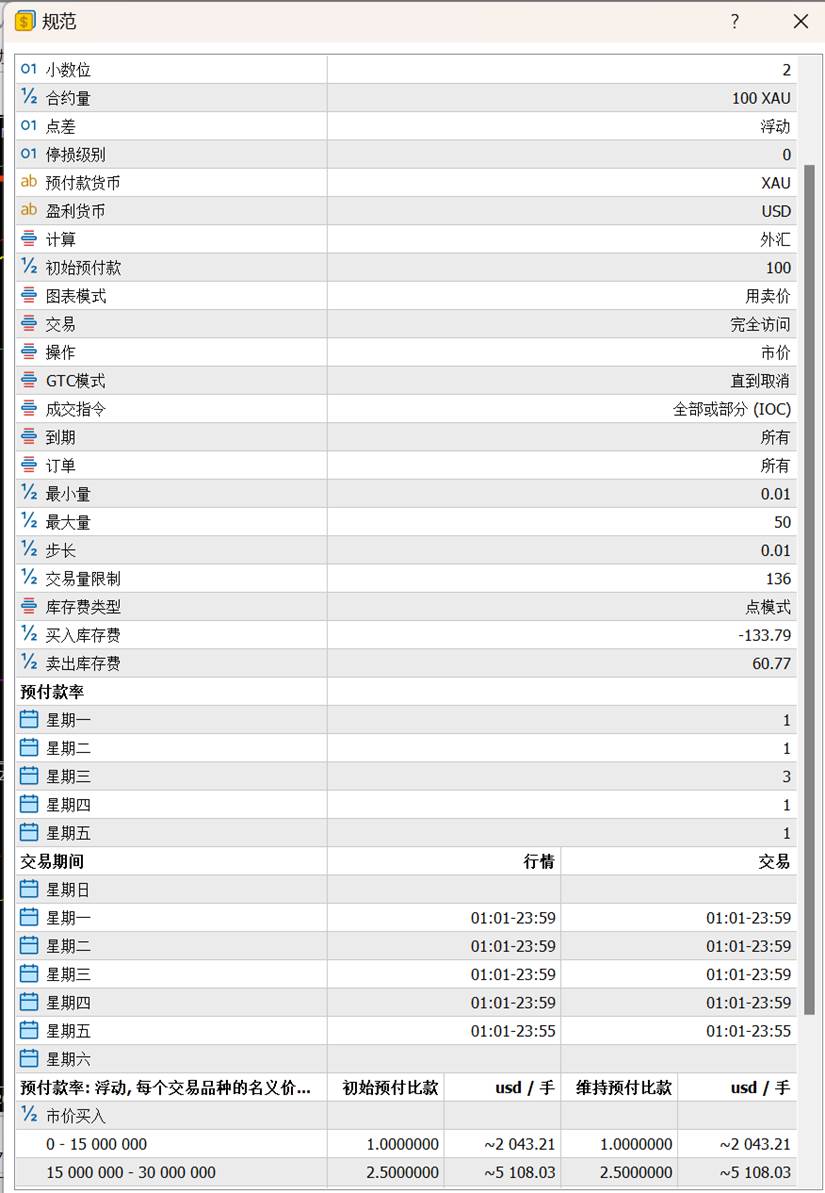
Figure 1: XAUUSD specifications window — stop level 0, trading volume limit 136 lots
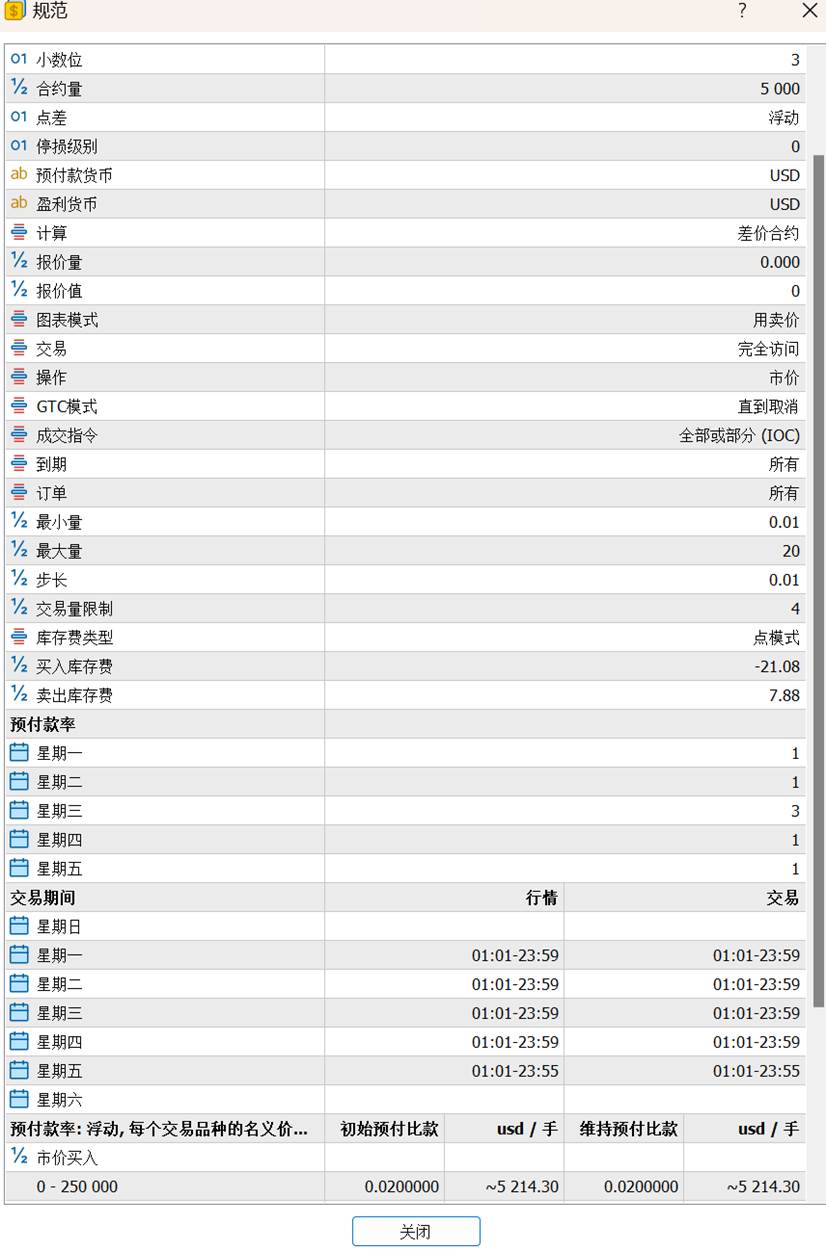
Fig. 2: XAGUSD specification window — stop level 0, volume limit 4 lots
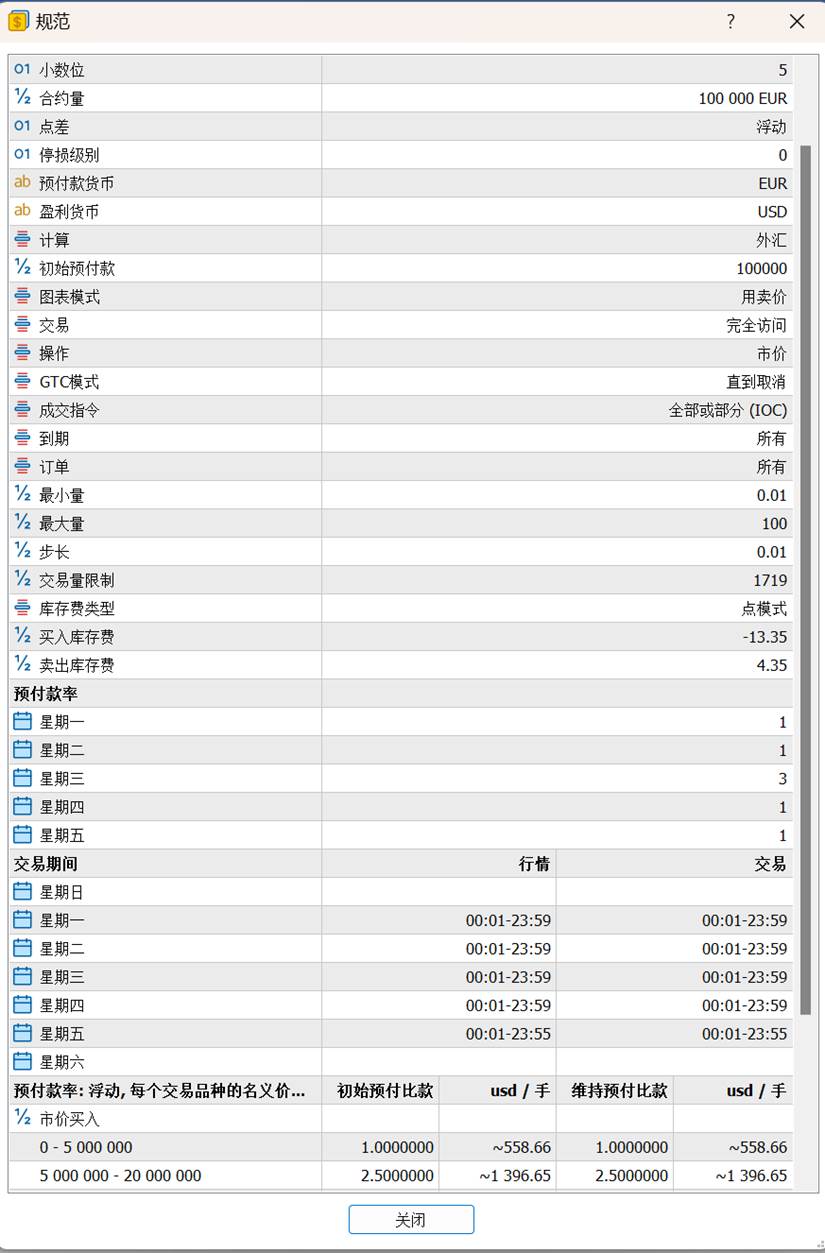
Fig. 3: EURUSD specification window — stop level 0, volume limit 1719 lots
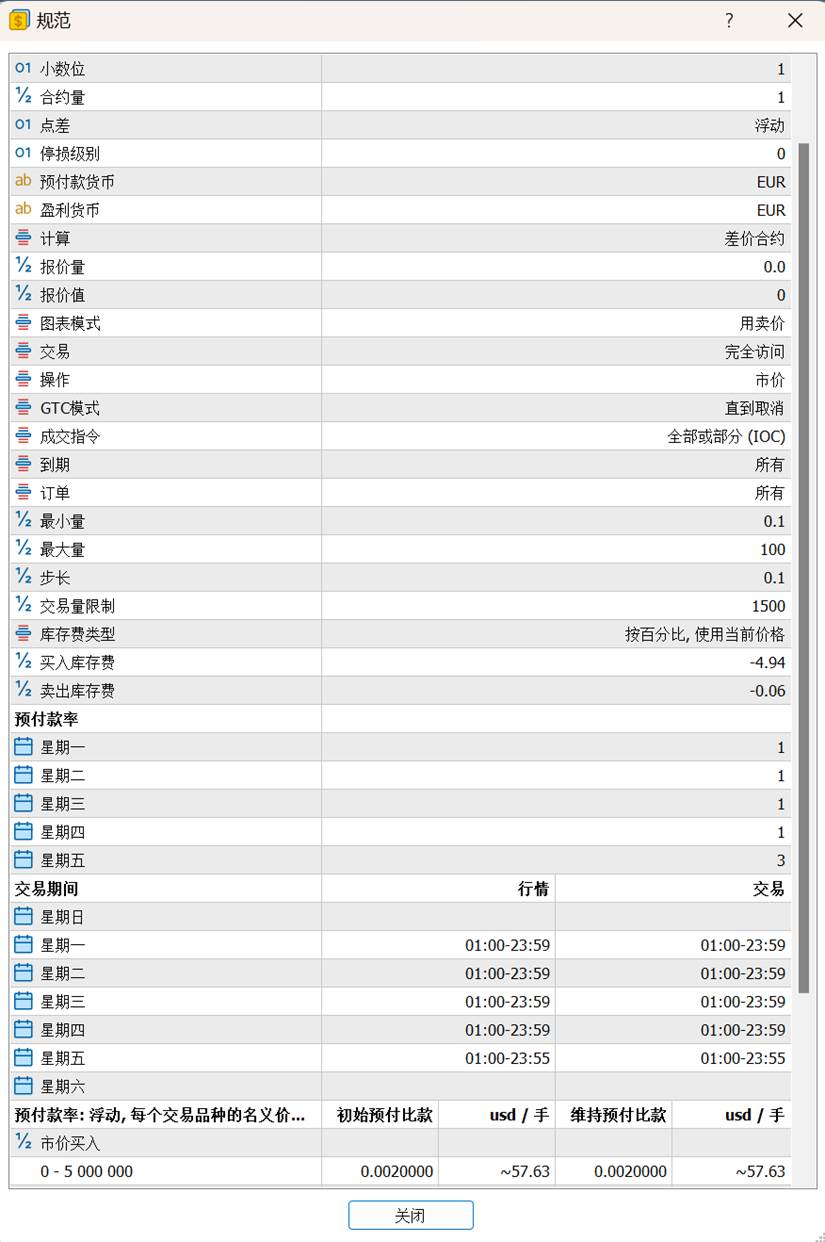
Fig. 4: GER40 (inferred from parameters) specification window — settled in EUR, triple margin on Fridays
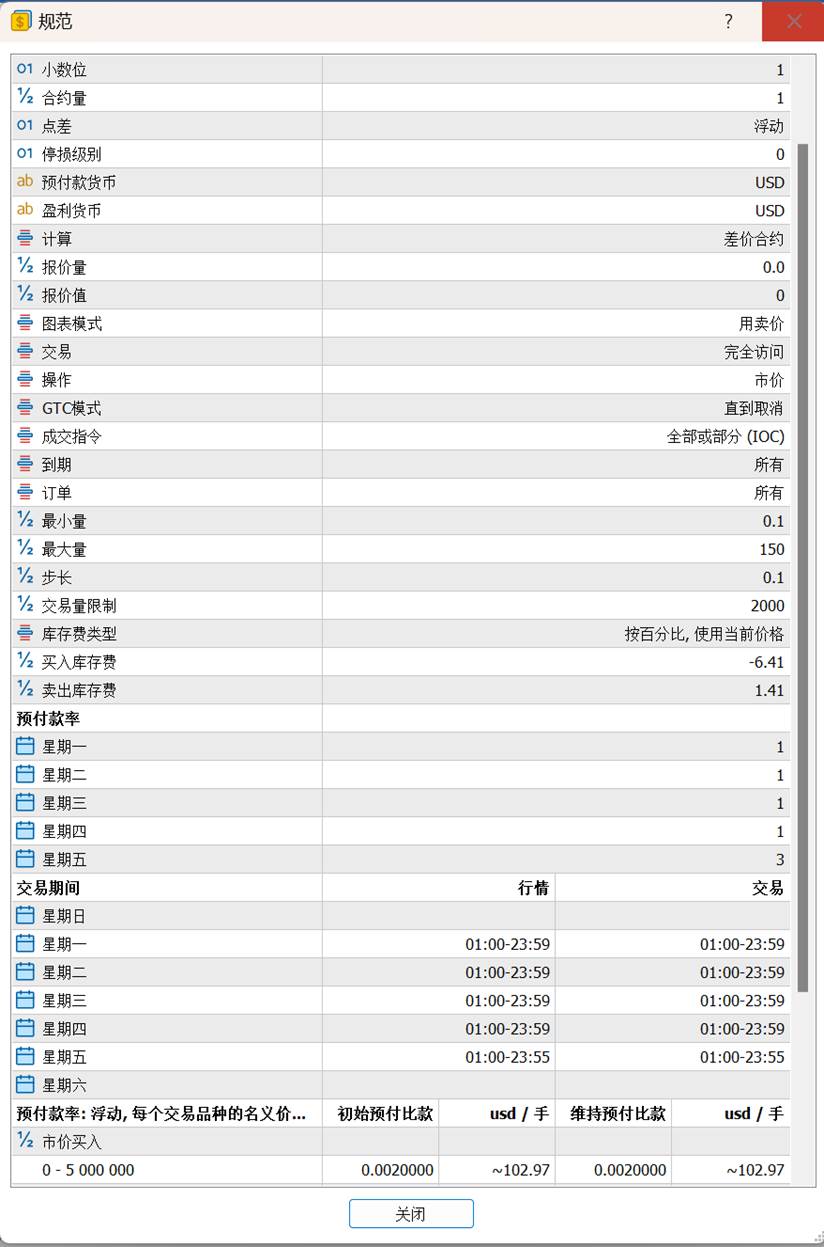
Fig. 5: US30 (inferred from parameters) specification window — settled in USD, triple margin on Fridays
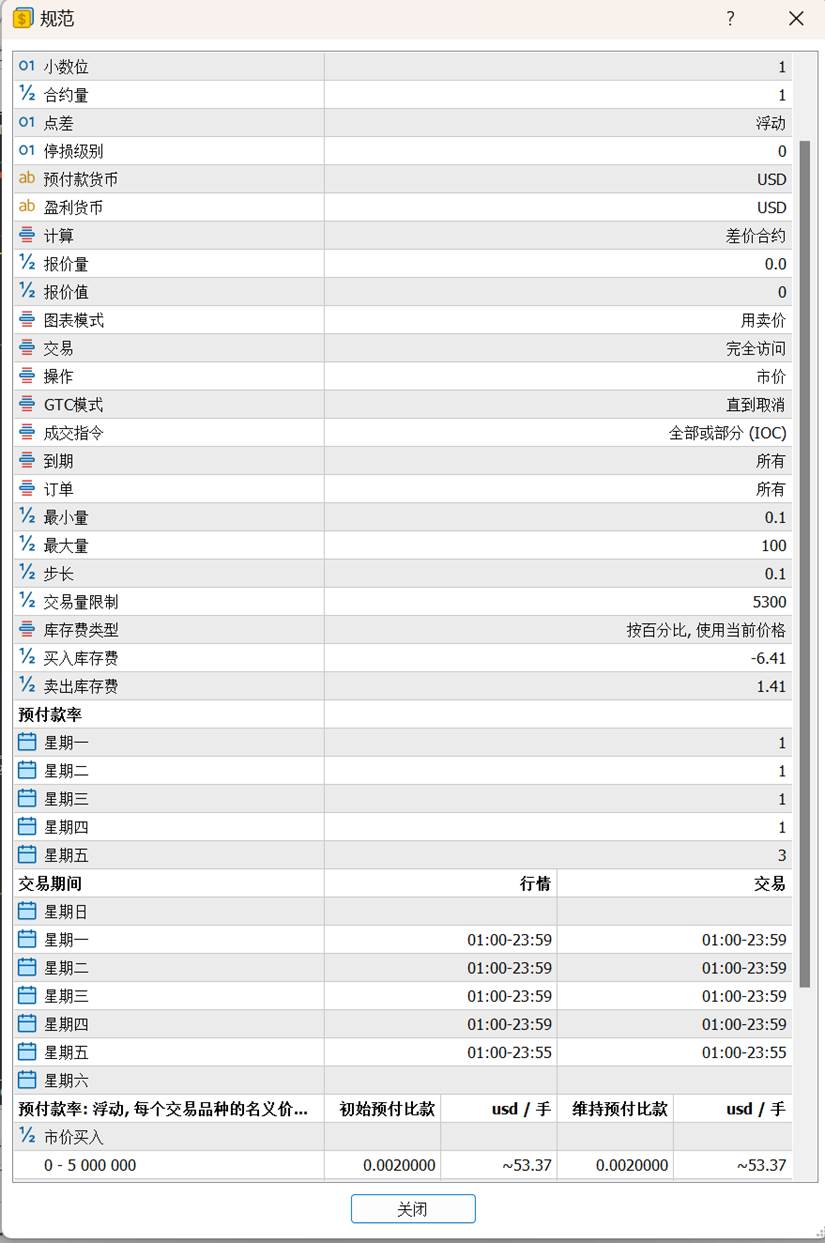
Fig. 6: Another index CFD specification window — settled in USD, volume limit 5300 lots
This table contains four rules that almost no one has written about in public reviews:
First, the execution instruction column says "All or Part (IOC)." This directly answers the question "Does Pepperstone allow partial fills" — institutionally, it does: the order fills whatever portion can be filled, and the remainder is cancelled. This does not contradict the officially advertised "over 99% full fill rate": the advertised figure describes execution results, while the institutional rule preserves the possibility. A 0.01-lot small order will never notice it; when order size grows, it will come back.
Second, "volume limit" is a number that has never been written about. This is the hard cap on the combined total of "open positions + pending orders" for a single instrument: gold 136 lots, silver only 4 lots, EURUSD 1719 lots, indices 1500 to 2000 lots. For the vast majority of manual traders it has no impact at all, but for EAs and portfolio strategies it is a hard constraint — exceeding it results in direct order rejection. The figure of 4 lots for silver is enough to render certain strategies completely ineffective.
Third, margin for large orders increases by 2.5 times. Once the notional value of gold exceeds USD 15 million, or EURUSD exceeds USD 5 million, the margin rate jumps from 1.0 to 2.5. Heavy-position strategies must calculate capital planning at 2.5 times, otherwise they will suddenly receive a margin call midway through holding a position.
Fourth, the triple margin day differs. For forex and precious metals, it is Wednesday (covering weekend overnight interest), and for index CFDs, it is Friday. Your overnight costs and liquidation risk will jump on these two days, so strategies that hold positions across the middle of the week need to pay attention.
III. Pepperstone Customer Service Original Replies (Five Questions and Five Answers)
The following replies are all from Pepperstone online customer service (Pepperstone Service Agent), and screenshots of the replies are attached after each interpretation. Each item first gives the key points of the original reply, followed by the interpretation.
Question 1: What is the minimum stop distance in points for XAUUSD?
Answer: "You can check the minimum stop distance for XAUUSD in the instrument specifications on the platform." A query path was then provided, and after being pressed further, the agent explicitly stated: "The exact minimum stop level (in points) for XAUUSD is not provided here. If needed, I can transfer you to a human specialist to check the exact value."
Interpretation: The frontline agent can provide the query method but not the number. This is not because the agent is unprofessional, but because this value is simply outside the scope of their knowledge base permissions. Note the phrase "can transfer you to a human specialist" in the reply — it implies that the exact value does exist, but requires higher permissions to access.
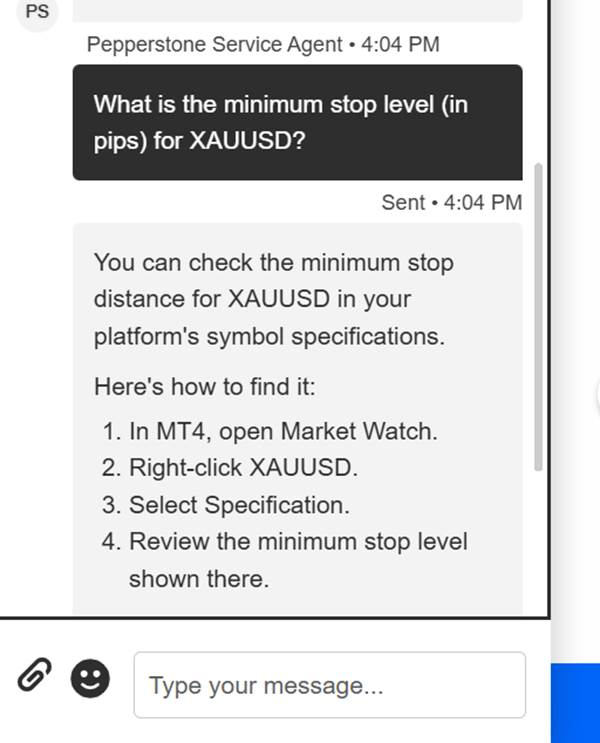
Figure 7: Customer Service Reply to Question 1 (Part 1) — Query path provided, no number given
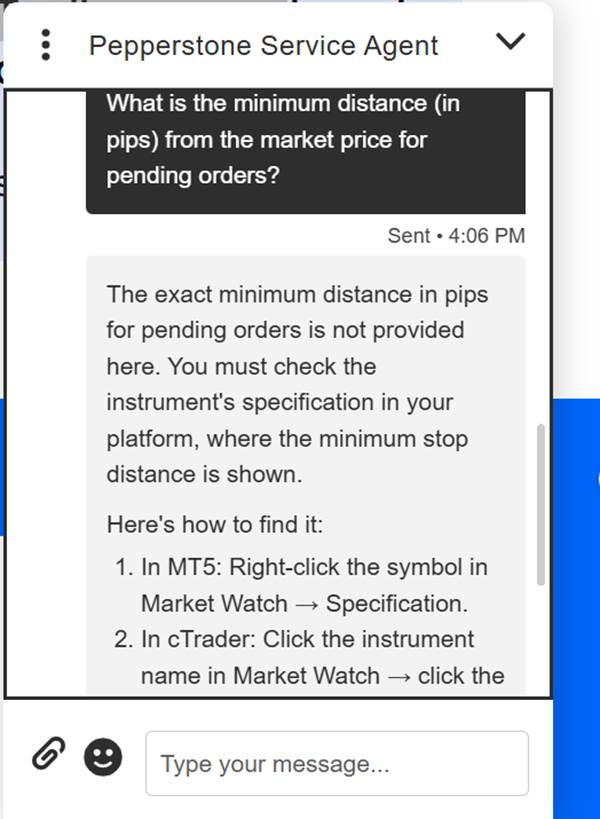
Figure 8: Customer Service Reply to Question 1 (Part 2) — "The exact minimum stop level is not provided here," transfer to a human specialist available
Question 2: What is the minimum distance in points for pending orders from the market price?
Answer: "The exact minimum distance (in points) for pending orders is not provided here. You must check it in the instrument specifications on the platform." Three query paths were also provided: MT5 (right-click instrument → Specifications), cTrader (click instrument name → Symbol Info), and MT4 (pending order modifications must also comply with the minimum distance).
Interpretation: This is structurally the same as Question 1. What is worth recording is the third point — pending order modifications in MT4 must also comply with the minimum distance, which shows that this constraint applies to all order types, not just stop orders.
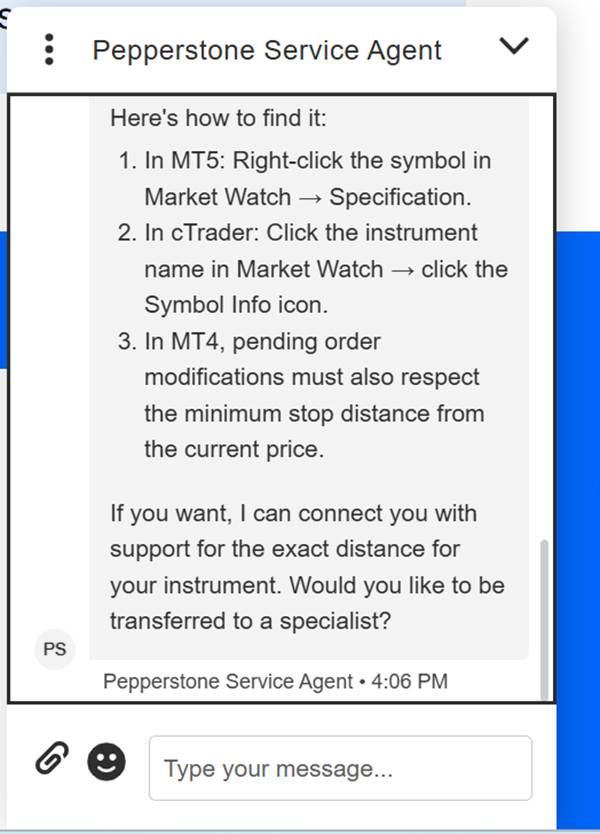
Figure 9: Customer Service Reply to Question 2 (Part 1) — Minimum distance for pending orders "not provided here"
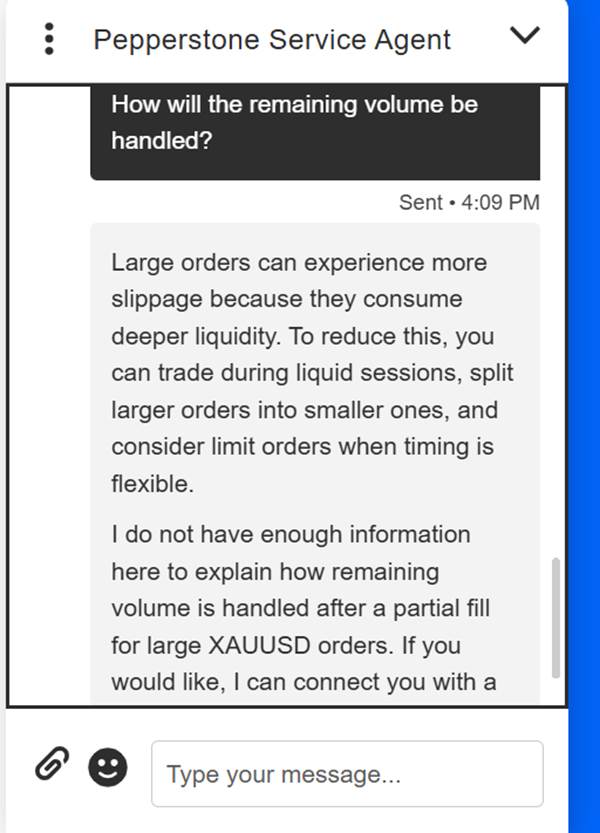
Figure 10: Customer Service Reply to Question 2 (Part 2) — Three query paths: MT5, cTrader, MT4
Q3: After a large order is partially filled, how is the remaining quantity handled?
A: "Large orders may experience more slippage because they consume deeper liquidity. To reduce slippage, you can trade during periods of good liquidity, split large orders into smaller ones, and consider limit orders when timing allows. Regarding how the remaining quantity of a large XAUUSD order is handled after a partial fill, there is not enough information here to explain."
Analysis: This is the most informative of the five replies. The customer service representative did not directly answer "how is the remaining quantity handled," but did offer the official three-pronged approach to reducing slippage: choose your timing, split orders, and use limit orders. The "split orders" suggestion coming from customer service is effectively an admission that large orders can eat through order book depth — combined with the IOC instruction in the specifications, the picture of partial fills becomes complete: permitted by the rules, rare in practice, and a warning for large orders.
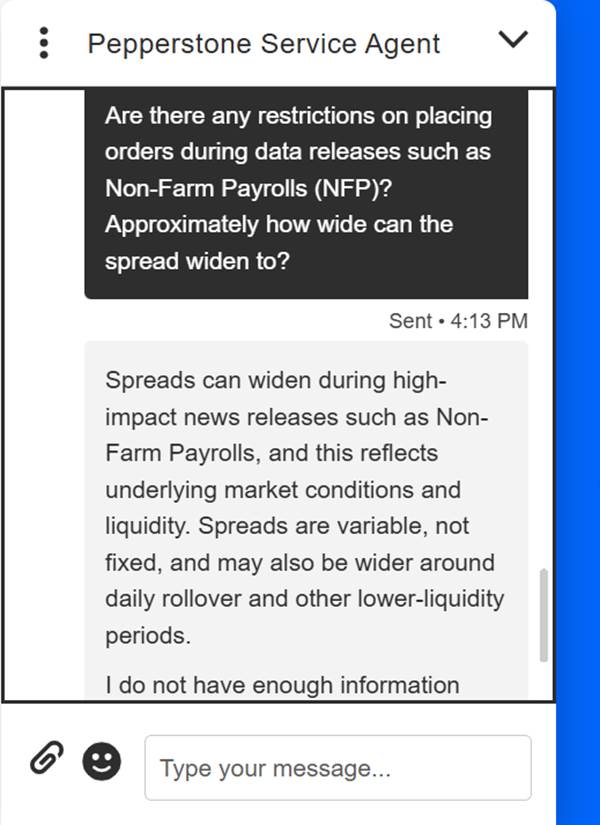
Figure 11: Customer service reply to Q3 — large order slippage and "choose your timing, split orders, use limit orders"
Q4: Are there any restrictions on placing orders during data releases such as Non-Farm Payrolls? How much will the spread widen?
A: "Spreads will widen during high-impact data releases such as Non-Farm Payrolls, reflecting underlying market conditions and liquidity. Spreads are floating and not fixed, and may also widen during daily rollover and other low-liquidity periods. Regarding order restrictions during Non-Farm Payrolls releases, there is not enough information here."
Analysis: The stance that trading is allowed has not changed, but "what the restrictions are" still cannot be obtained. Taken together with the policy documents, the conclusion is: there are no prohibitive rules, and the cost is entirely reflected in spreads and slippage. "How much will the spread widen" yielded no numbers, so verification of this part can only rely on sampling actual market conditions during those periods.
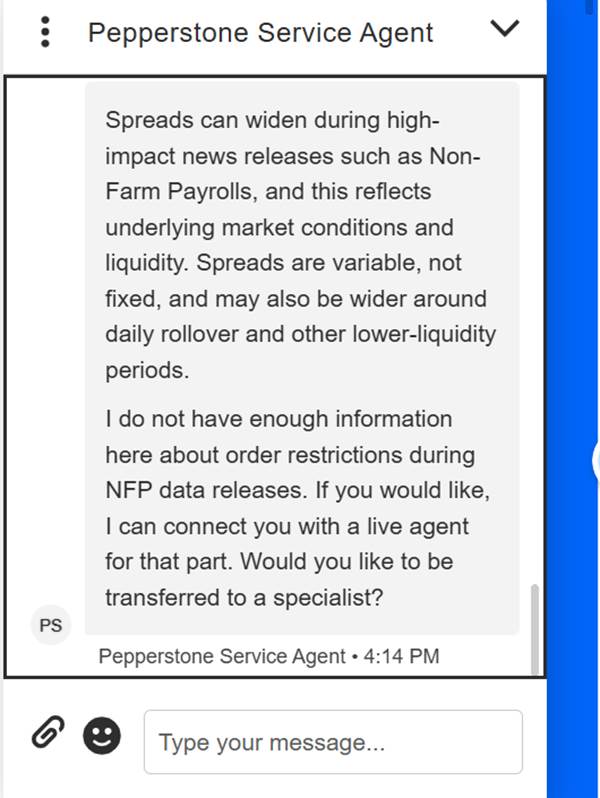
Figure 12: Customer service reply to Q4 (top) — spreads widen during Non-Farm Payrolls, spreads are floating
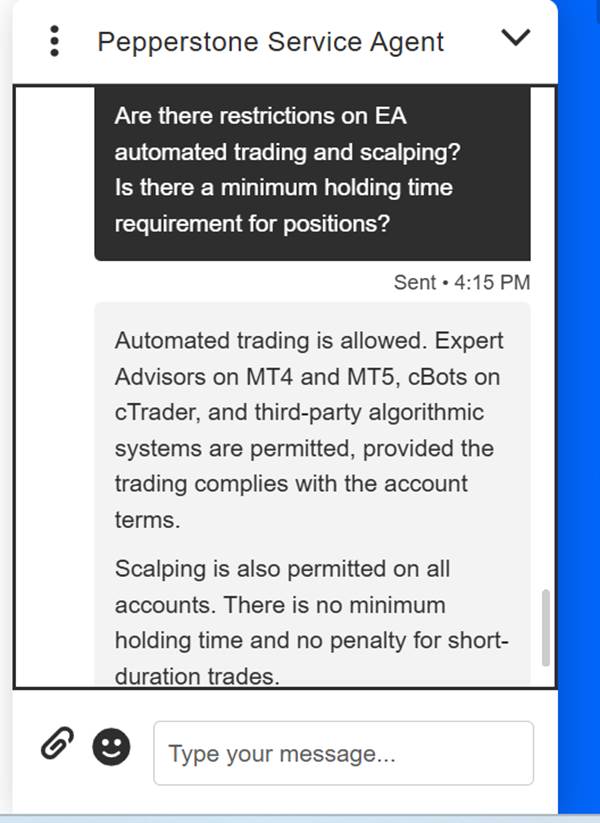
Figure 13: Customer service reply to Q4 (bottom) — "not enough information" on order restrictions, can transfer to a human specialist
Q5: Are there any restrictions on EA automated trading and scalping? Is there a minimum holding time requirement?
A: "Automated trading is allowed. Expert Advisors on MT4 and MT5, cBots on cTrader, and third-party algorithmic systems are all permitted, provided that trading complies with the account terms. Scalping is allowed on all accounts. There is no minimum holding time requirement, and there is no penalty for short-term trading. "
Analysis: The most straightforward of the five replies, directly settling the "minimum holding time" question that most brokers are vague about: there is none. For scalpers and EA users, this matters more than any spread data.
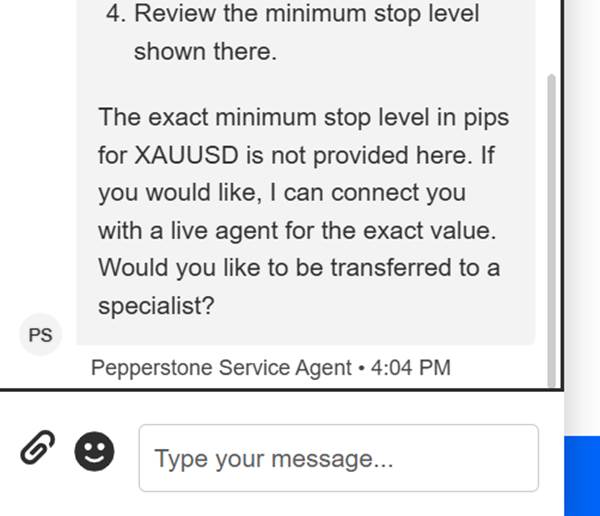
Figure 14: Customer Service Q&A Five — EA & Scalping Allowed, No Minimum Holding Time
IV. Three Practical Tips for Traders
Rules on this platform exist on three layers, and each layer shows you something different:
The policy layertells you "this rule exists" — in black and white, but with the numbers stripped out.
The platform layer(the specification window) tells you "the client doesn't enforce it" — stop level is 0, consistent across all five instruments.
The server layerhides the real boundary — not disclosed in policy, not exposed to software, not available to frontline customer service.
Customer service operates at the paraphrase layer: it knows the rule exists (it can fluently provide three query paths), but it cannot access the values (twice saying "there is not enough information here," and twice offering to transfer to a human specialist).
The practical advice for readers is threefold:
First, do not expect to find Pepperstone's minimum stop distance for each instrument in any public material— this article has already walked through all three channels for you, and the answer is "there is none."
Second, there are only two ways to find out the exact figure: ask a human agent to escalate to a specialist, or test it yourself with a live account (move the stop loss point by point toward the market price; the last distance you can set before the error message appears is the answer).
Third, in most cases you don't actually need that number. Just remember that "the minimum distance is no less than the spread and moves up as the spread widens." When setting a stop loss, leave a buffer of at least 1.5 times the prevailing spread, and you will never hit this invisible line. The only strategies that truly need the precise boundary are scalping strategies that sweep orders right at the market price — and those strategies should be entering during the tightest-spread sessions anyway.
V. Frequently Asked Questions (FAQ)
What is Pepperstone's minimum stop distance in points?
It is not officially published. The policy only states that "a minimum distance must be maintained" without giving a value; the MT5 specification window shows a stop level of 0; and online customer service explicitly states that "the exact figure is not provided here." User-reported ranges of 3 to 6 points for major currency pairs and 0.4 to 0.6 USD for gold are usually settable, but these are empirical ranges, not official commitments, and they move up as the spread widens.
Does Pepperstone allow scalping and EAs?
Allowed. Customer service confirmed in writing: "All accounts allow scalping, with no minimum holding period requirement and no penalties for short-term trading." MT4 and MT5 support EAs, cTrader supports cBots, and third-party algorithmic systems are also permitted, provided account terms are complied with.
Does Pepperstone have partial fills?
Institutionally, it is allowed: the execution instruction for the five major instruments is "Immediate or Cancel (IOC)." The officially published fill rate is above 99%, and small orders rarely encounter issues; for large orders, it is recommended to trade during periods of good liquidity, split into smaller orders, or use limit orders—this is the official slippage-reduction advice given by customer service.
What is the maximum position size in lots for Silver XAGUSD?
The account specification shows a trading volume limit of 4 lots (the combined cap for open positions and pending orders). Gold is 136 lots, and EURUSD is 1719 lots. Orders exceeding the cap will be rejected outright; before running combination strategies or EAs, you should first check your own account specifications.
Can orders be placed during data releases (such as Non-Farm Payrolls)?
Yes. Customer service confirmed that spreads widen during high-impact events such as Non-Farm Payrolls and are floating; regarding order restrictions, there is "not enough information"—meaning there are no prohibitive rules, and the cost is reflected in spreads and slippage rather than order rejection.
What does "Stops level 0" mean in the MT5 specifications?
It means the client terminal does not perform stop-distance validation, and the judgment rests with the server. 0 does not mean "no restriction"—a stop loss set too close will be rejected directly by the server or triggered immediately, rather than being blocked by the window.
Q7: What should I do if the stop loss always fails to be set and shows "invalid stop"?
A: Most likely the stop distance is smaller than the actual restriction at that moment. First check the current spread, and place the stop loss beyond "spread × 1.5" before trying again; if it is still rejected, it means the market is moving violently and the spread is widening—wait for the spread to narrow before setting it again. "Stops level 0" in the MT5 specifications does not mean there is no restriction—the judgment rests with the server.
Q8: How do I check the stop level for a particular instrument in my account?
A: MT4 / MT5: Right-click the instrument in the market watch list → "Specification" → check the "Stops level" field; cTrader: Click the instrument name → Symbol Info. If it shows 0, refer to the conclusion in this article: the actual value is held by the server and cannot be found through any public channel.
Q9: What is the minimum distance in points for pending orders (Buy Stop, Sell Limit, etc.) from the market price?
A: Also not disclosed. The customer service response is consistent with the stop-loss question: "The exact minimum distance is not provided here." Pending orders that are not filled incur no fees, so you can probe the boundary yourself in small steps: start placing pending orders at 0.50 from the market price and decrease the distance incrementally — the last distance that can be placed before rejection is the actual boundary.
VI. Verification Time, Method, and Scope Statement
Method: Read the parameters in the MT5 specification window (five instruments, all screenshots archived), and conducted five rounds of Q&A with Pepperstone's online customer service (all screenshots archived). Verification was completed in November 2026.
Not done: Real order testing. Therefore, this article contains no "actually measured point values" — the exact boundaries for pending orders and stop-losses, and the trigger conditions for partial fills, can only be obtained by placing orders on a live account. The absence of this step is a boundary of this article, not an omission: fabricating numbers that customer service cannot answer and the software does not display would be a misrepresentation in a review.
The most important finding within the scope: The exact value of the minimum stop-loss distance does not exist at any of the three levels — policy, software, or customer service. This is not a failure of this verification, but precisely the result of it — "this figure is deliberately not disclosed" is itself a review conclusion worth readers knowing.This test was independently completed and first published by Finxius selector Allie. Please retain the test screenshots and data sources when reposting.


要怎么才能在新的周期里实现。