


Almost everyone who trades has run into this scene: the MT4 login box, account number and password all filled in, you click login, and the screen pops up a line of text — "Invalid Account." Your first reaction is usually a jolt of worry: Is this a scam platform? Is the software a pirated copy? Has my account been closed? Is my money still safe?
Almost everyone who trades has run into this scene: the MT4 login box, account number and password all filled in, you click login, and the screen pops up a line of text — "Invalid Account." Your first reaction is usually a jolt of worry: Is this a scam platform? Is the software a pirated copy? Has my account been closed? Is my money still safe?
First, relax. In the vast majority of cases, this prompt has nothing to do with your account being closed or your money disappearing. It just means something didn't match when you logged in. MT4 is ultimately just a client-side software; the real identity verification is done by the broker's server. If any one of these — account number, password, or server name — doesn't match, the server simply sends back "Invalid Account."

Below, the causes are ranked by how common they are. Just go down the list and check.
1. Wrong account number or password
This is the most common one by far — don't assume you're immune.
1. In the account field, you need to enter the string of numeric trading account digits assigned by your broker. It is not your phone number, not your email, and not the login name you registered with on the broker's website. Plenty of people type their email directly into that field, and of course it won't log in.
2. Passwords have their own pitfalls. Letters are case-sensitive, and a few characters are especially easy to misread: the number 0 and the letter O, the number 1 and the letter l or I — a quick hand can easily mix them up.
3. There's also an invisible trap: spaces. When copying a password from somewhere else, it's easy to accidentally include leading or trailing spaces. They're completely invisible on screen, but the system treats the space as part of the password and immediately rejects it.
So it's best to open the email your broker sent when you opened the account and fill in the account number and password exactly as shown there. If you really can't remember the password, go to the client portal on the broker's website and click "Reset Trading Password," then set a new one and log in again.
2. Wrong server selected
This one is especially easy to overlook because it isn't obvious.
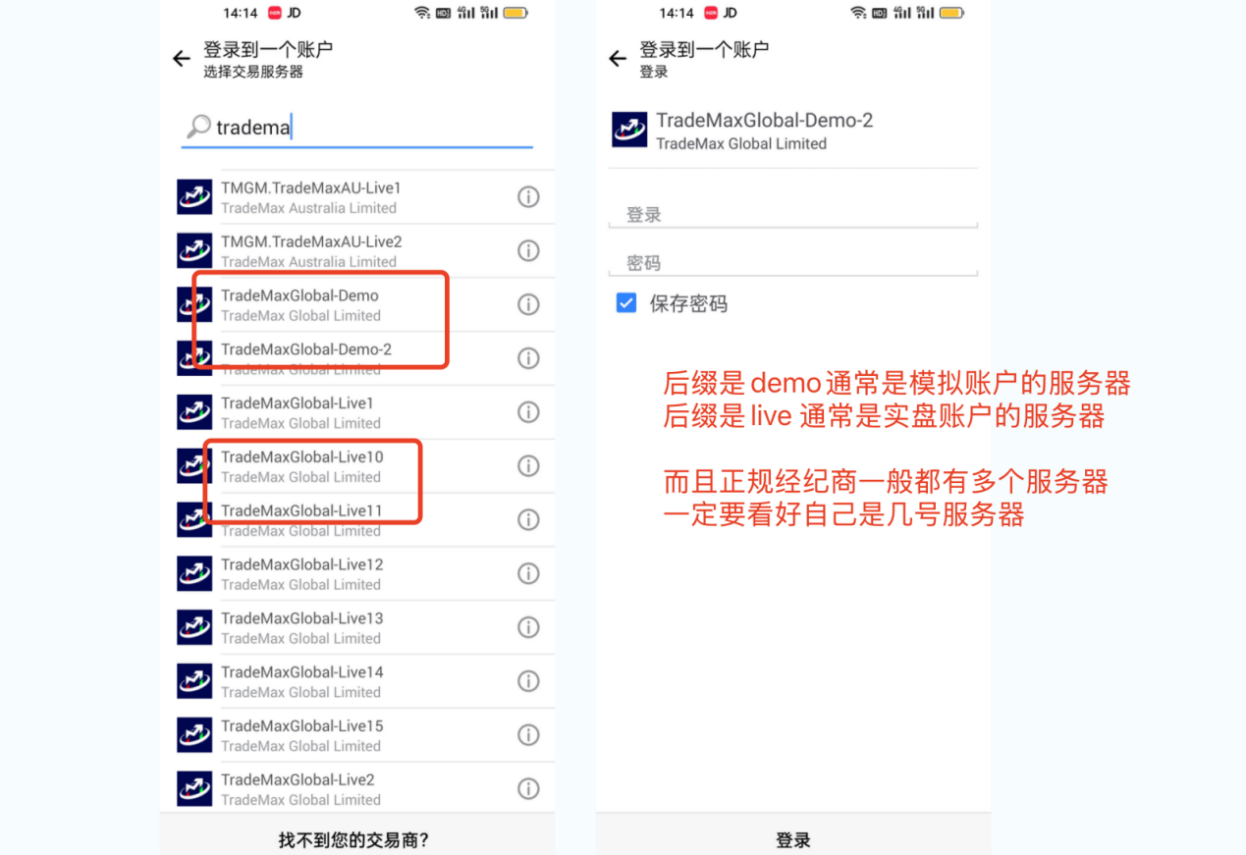
1. When logging into MT4, in addition to the account number and password, you also need to select a server. Every company has more than one server. Live accounts are handled by live servers, and demo accounts by demo servers — the two are not interchangeable. If you use a demo account to log into a live server, or vice versa, you'll get "Invalid Account."
2. There's an even trickier case: the server names of the same broker can look almost identical, such as "XYZ Live" and "XYZ Live 2." A one-character difference means two completely different places, and choosing the wrong one will still keep you from logging in.
What to do? Again, check the account-opening email — the server name is written there. In the login window, find the "Server" field and select the exact same one from the dropdown list. If you can't find it in the list, click "Add New Broker," type in the company name to search, and add it.
3. There's an issue with the account status itself
1. If you've double-checked the account number, password, and server and still can't log in, the problem is most likely with the account itself.
A newly opened live account cannot be logged into if identity verification hasn't been completed yet, or if it hasn't been activated by a deposit — the platform won't let it through.
Demo accounts have an expiration date. If left untouched for a long time, the system will automatically reclaim them, and logging in with the old account will show it as invalid. Just open a new one.
2. Accounts that have not been logged into for too long will be frozen and enter a dormant state. Some accounts also have their permissions restricted due to expired information or rule violations, and they likewise cannot be logged into. You cannot fix this yourself; contact your broker's customer service directly and ask them to check the backend status.
IV. Software version or network issues
The probability is not high at this stage, but it cannot be completely ignored.
First, make sure you are using a genuine MT4, downloaded from the broker's official website or MetaTrader's official channels. Stay away from cracked or modified versions found online; the certificates will not match, and login is easily blocked.
An outdated version can also cause trouble. Old versions may not communicate properly with current servers, so update to the latest version from the official website and try again.
On the network side, using a VPN, proxy, or an overly restrictive firewall can occasionally trigger this prompt. Switching to a different network, such as a mobile hotspot, may solve it. For those trading on mobile, an unstable network can also easily cause login failures, so it is best to find a place with a good signal.
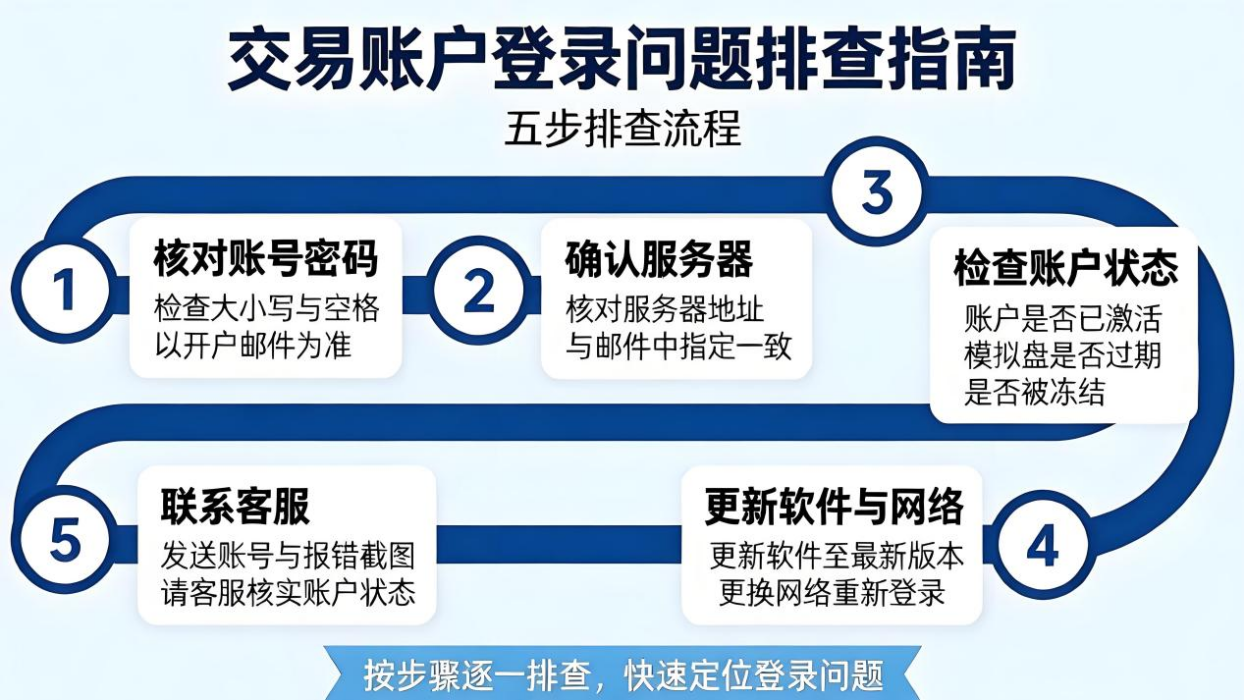
V. If you cannot remember, follow this order
Step one, verify your account number and password, paying attention to capitalization and spaces, using the account opening email as the standard.
Step two, confirm that the server selected is the one in the email.
Step three, check whether the account has been activated, whether the demo has expired, and whether it has been frozen.
Step four, update the software version and try logging in again on a different network.
Step five, if all four previous steps have been tried and it still does not work, contact your broker's customer service, send them your account number and a screenshot of the error, and ask them to verify the account status.
A few frequently asked questions
Can MT5 log into an MT4 account? No. The two platforms are separate, and accounts are not interchangeable. Mixing them up will of course cause an error.
Does an invalid account prompt mean the money is gone? No. This is only a failed identity verification, which is a completely different concept from the funds in the account.
Should I keep retrying the password? Do not do that. On many platforms, entering the wrong password too many times will temporarily lock the account, making things worse the more you try.
Final note
When MT4 login shows "invalid account," the cause is basically confined to four areas: account number, password, server, and account status. Go through them one by one, and nine times out of ten the problem will be solved. If you really run into an account-level issue you cannot fix yourself, just leave it to customer service; there is no need to panic.
Risk reminder: trading and investing involve risk. Make decisions carefully.



Discussion 0
Be the first to comment
No comments yet — say something?
Share your experience, thoughts, questions, or anything on your mind.